एक AI से बात करना बंद करें।
पूरी टीम की कमान संभालें।
Vibe Sensei वह कॉकपिट है जहाँ आप AI एजेंटों की एक टीम की कमान संभालते हैं जो समानांतर में कोड लिखते हैं — Claude, Codex, Gemini, Cursor और अन्य — हर एक एक दिखाई देने वाले टर्मिनल में, एक ऑर्केस्ट्रेटर द्वारा समन्वित। अब आप कोड नहीं लिखते। आप ऑर्केस्ट्रा का संचालन करते हैं।
Cancel anytime — no lock-in, no cancellation fees.
Your machine. Your git. No black box. · You pay the providers. We never resell tokens.
नेटिव डेस्कटॉप ऐप — macOS और Windows पर इंस्टॉल होता है, 100% स्थानीय रूप से चलता है, और ऑटो-अपडेट होता है। अपने खुद के हार्डवेयर पर पूरी शक्ति।

Building your app, live
From idea to shipped. In one cockpit.
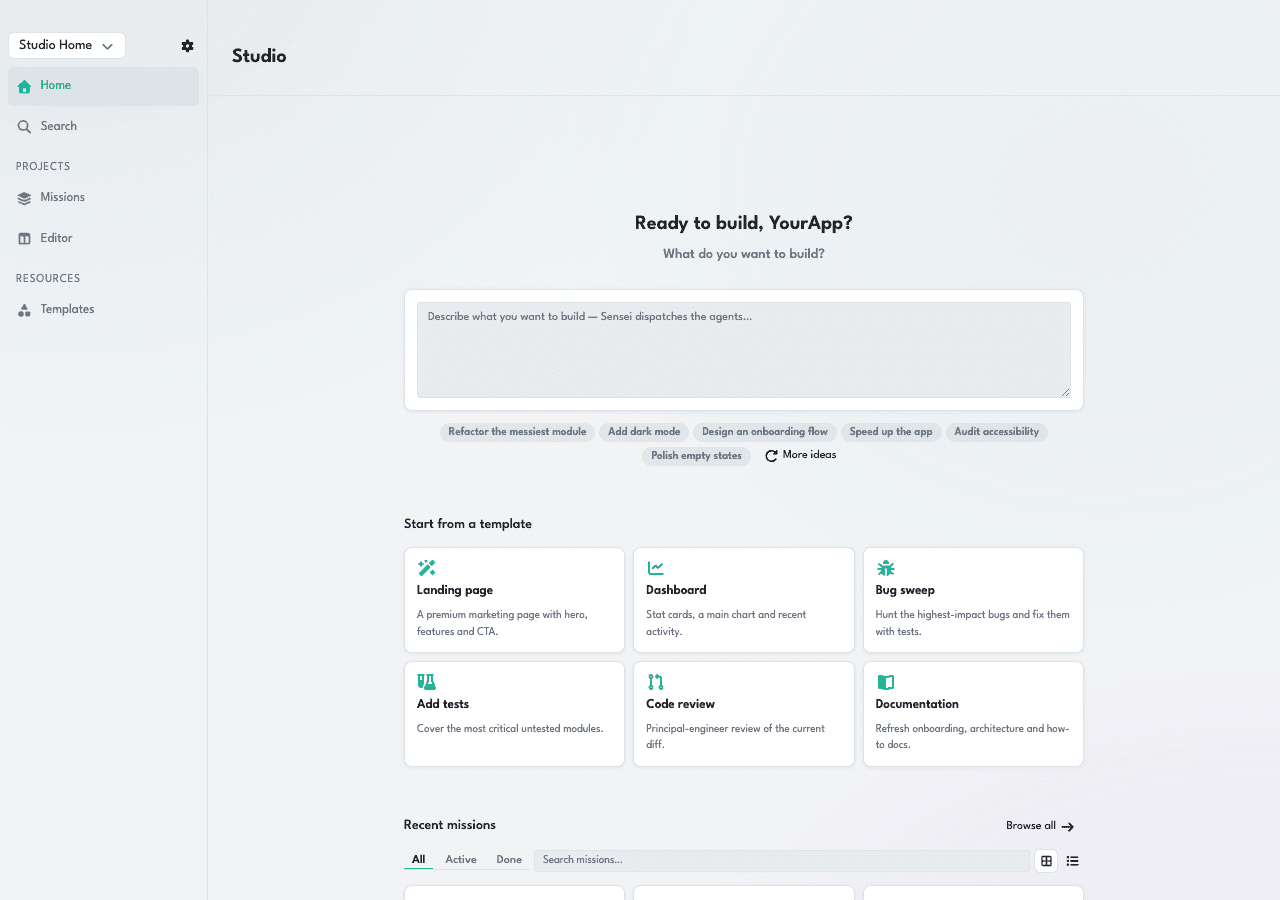

Type what you want to build and hit enter. Mr Kody decomposes it into a plan and dispatches the right agents automatically — no prompt engineering, no boilerplate.
Agents that work alongside you — not instead of you. You stay in command; the squad moves in parallel.
- Local-first · runs on your machine
- Your tokens, your machine · no token resale
- Multi-CLI: Claude · Codex · Gemini · Grok
- Encrypted tokens · AES-256-GCM
Works with your AI CLIs
- Claude Code
- Codex
- Gemini CLI
- Grok
- GitHub Copilot
- Cursor
- Kimi
AI पहले ही कोड लिख रहा है।
लेकिन आप अब भी एक बार में एक ही एजेंट से बात करते हैं।
AI विकास में विस्फोट हुआ — लेकिन उपकरण अब भी 1:1 चैट में फँसे हैं। AI 10× तेज़ हो गया; उसे समन्वित करने वाला इंसान नहीं।
- ✕1:1 चैट — आप पूछते हैं, इंतज़ार करते हैं, समीक्षा करते हैं, फिर पूछते हैं।
- ✕"स्वायत्त" एजेंट एक ब्लैक बॉक्स के भीतर छिपकर चलते हैं।
- ✕एक ही मॉडल से बंधे, टोकन मार्जिन के साथ पुनर्विक्रय किए जाते हैं।
- ✕जिस गति का AI ने वादा किया, उसकी अड़चन आप ही बन गए।
- एजेंटों का एक दस्ता एक साथ समानांतर में काम करता है।
- हर एजेंट एक दिखाई देने वाले टर्मिनल में — आप सब कुछ होते देखते हैं।
- हर कार्य के लिए सर्वोत्तम मॉडल। आप प्रदाताओं को सीधे भुगतान करते हैं।
- आप ऑर्केस्ट्रा का संचालन करते हैं और अगले मोर्चे के लिए हमेशा स्वतंत्र रहते हैं।
Stop being the bottleneck. Command the squad.
एक कॉकपिट जो आपको प्रोग्रामर से कंडक्टर में बदल देता है।
एक ऑर्केस्ट्रेटर वर्करों के दस्ते की कमान संभालता है — आप हर टर्मिनल, हर एजेंट की स्थिति, साझा टू-डू सूची, और रीयल-टाइम में आते हैंडऑफ़ देखते हैं। सब कुछ दिखाई देता है, सब कुछ आपकी मशीन पर।
| Local-first, multi-CLI | Vibe Sensei | Manual multi-CLI | Single-vendor · cloud AI |
|---|---|---|---|
| Where your code runs | Your machine | Your machine | Vendor cloud |
| AI providers | Any — 6+ CLIs, one cockpit | Any — one terminal each | One vendor |
| Tokens | Yours — no resale, no markup | Yours | Bundled / metered |
| Agents at once | Many, in parallel | You tab between terminals | One agent / chat |
| Orchestration | One proxy delegates & verifies | You copy-paste between tools | Single-threaded |
| What you see | Every agent in a live pane + mission board | Scattered terminal windows | A chat log |
| Voice coding | Offline, local Whisper | — | Cloud transcription |
Columns are workflow categories, not specific products — each cell describes how that class of setup typically works. Running several CLIs by hand is a real, valid choice; the difference is the orchestration, parallelism and visibility Vibe Sensei layers on top.
वही CLI चलाता है जो आप पहले से उपयोग करते हैं
मिशन और दस्ते
समानांतर कार्य को git worktree द्वारा अलग किए गए मिशनों में लपेटें — हर एजेंट दूसरे को बाधित किए बिना काम करता है। दस्ते (भूमिकाओं और प्लेबुक वाले ऑर्केस्ट्रेटर + वर्कर) सहेजें और एक क्लिक में सक्रिय करें।
हैंडऑफ़ और वर्कर कॉन्ट्रैक्ट
हर वर्कर को एक स्वचालित कॉन्ट्रैक्ट मिलता है: पूरा होने पर वह handoff_submit के माध्यम से एक संरचित परिणाम लौटाता है। ऑर्केस्ट्रेटर एकत्र करता है, संश्लेषित करता है, और साझा टू-डू सूची प्रगति को लाइव दर्शाती है।
ऑफ़लाइन वॉइस कोडिंग
Whisper के माध्यम से 100% लोकल ट्रांसक्रिप्शन के साथ आवाज़ से कमांड बोलें — आपका ऑडियो कभी मशीन से बाहर नहीं जाता। यह बोली गई भाषा का पता लगाता है, प्रॉम्प्ट को अनुकूलित करता है, और आपकी भाषा में उत्तर देता है।
लाइव लागत और टोकन
हर पेन में एक कॉस्ट बैज दिखता है जिसमें टोकन और खर्च रीयल-टाइम में बढ़ते हैं, मिशन के अनुसार समेकित। हर एजेंट कितना खर्च करता है इस पर पूरी पारदर्शिता — बजट आपके नियंत्रण में।
Claude, Codex, Gemini, Grok — one cockpit, in parallel.
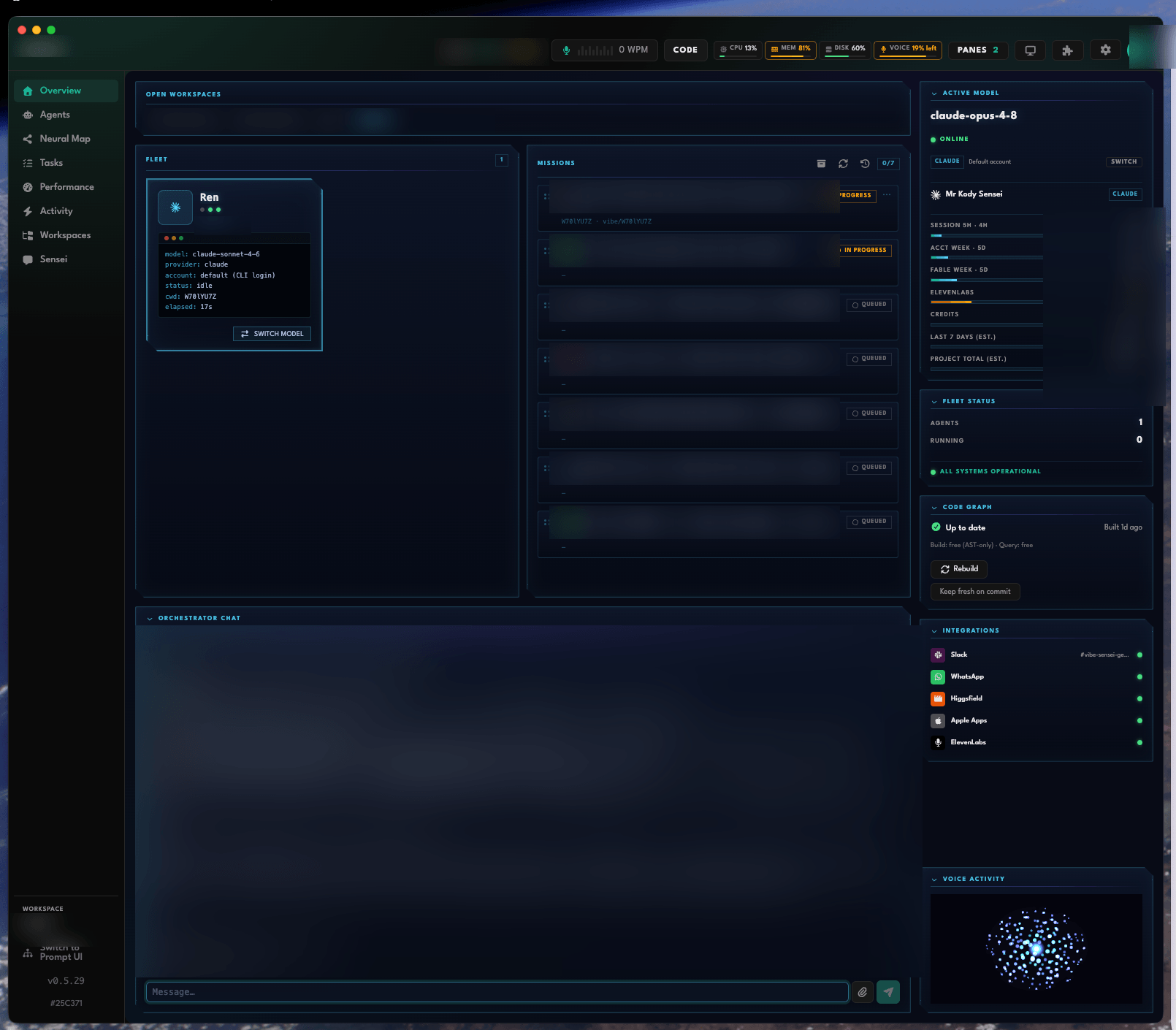
Not a concept render — these are actual captures of the shipped desktop app. Four home surfaces, one command center.
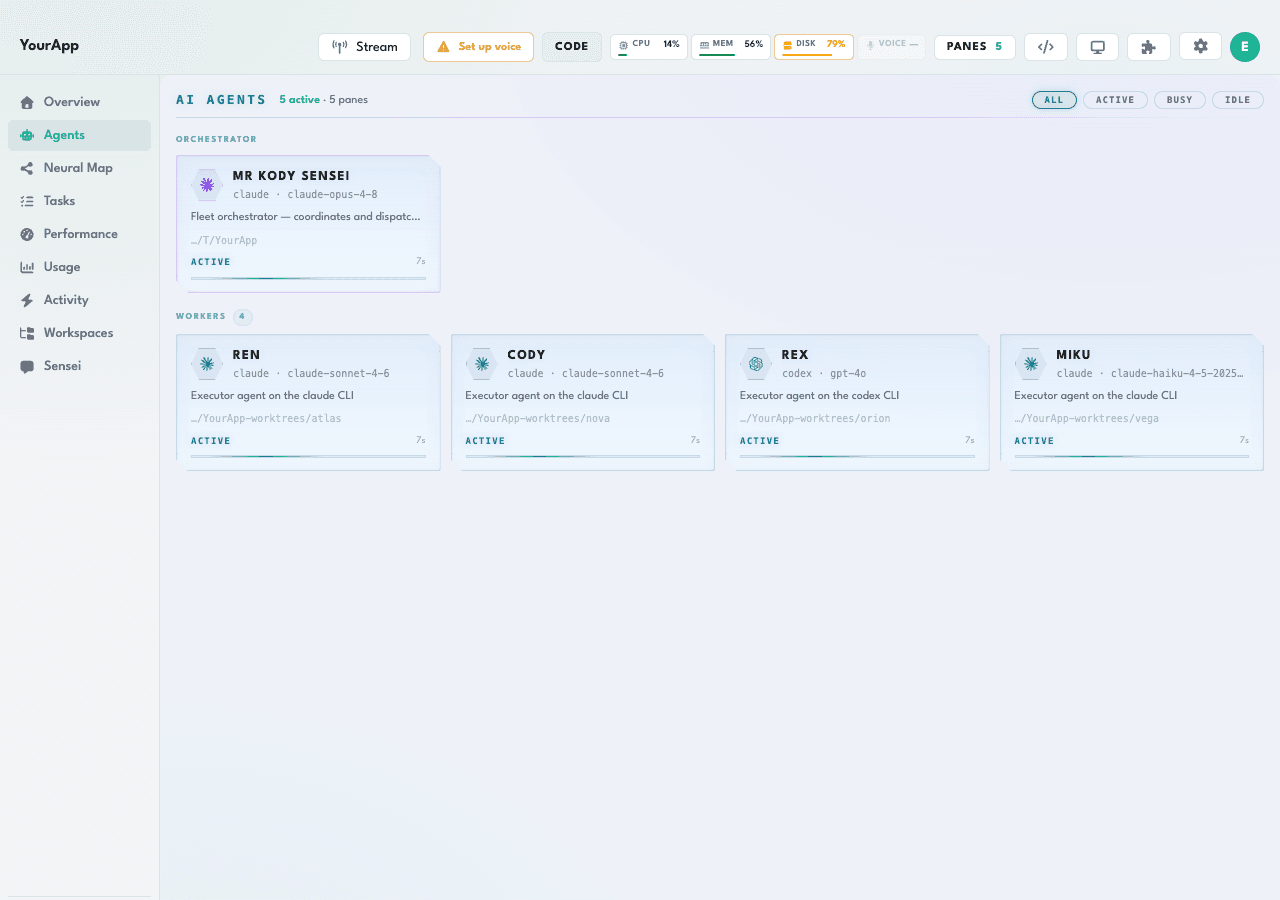
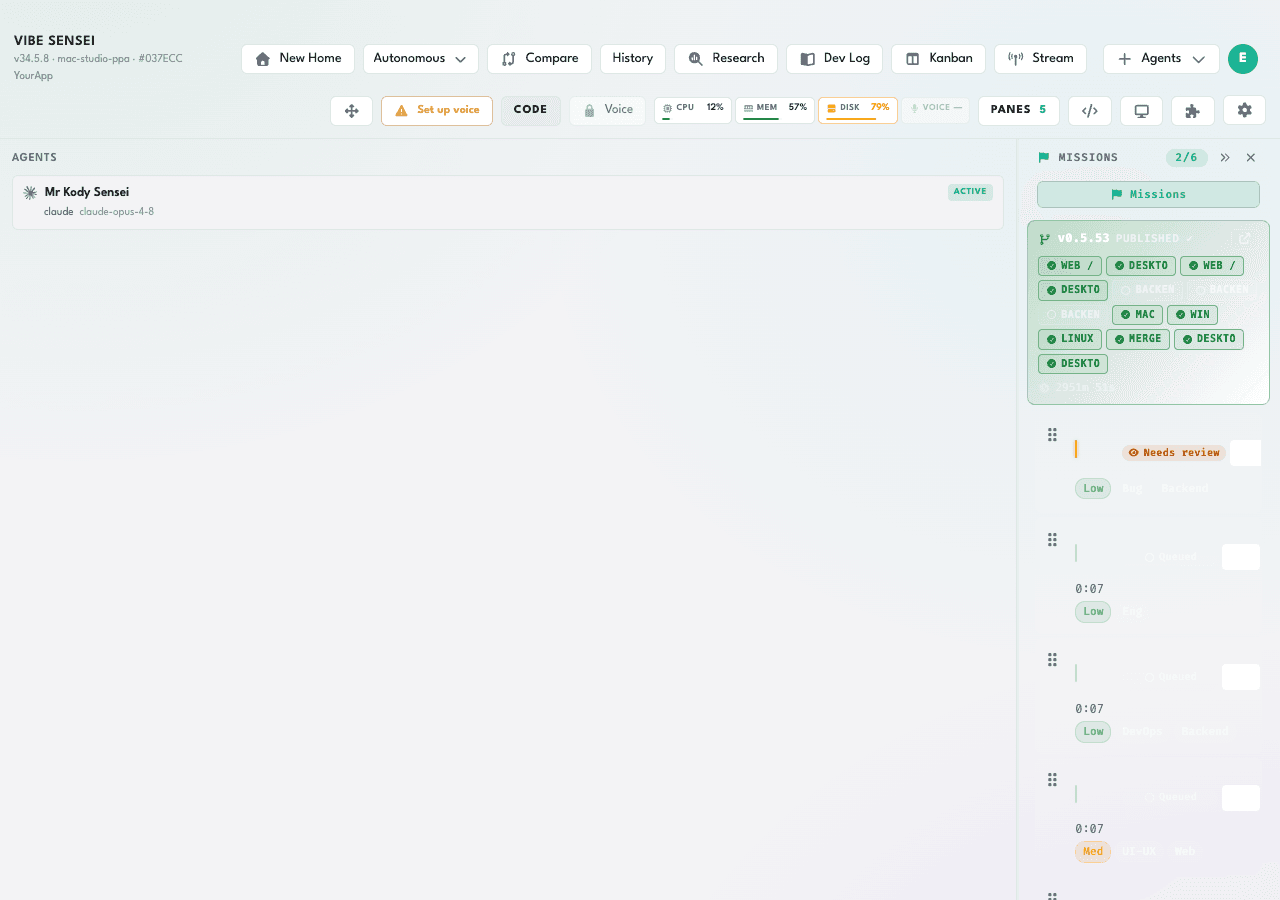
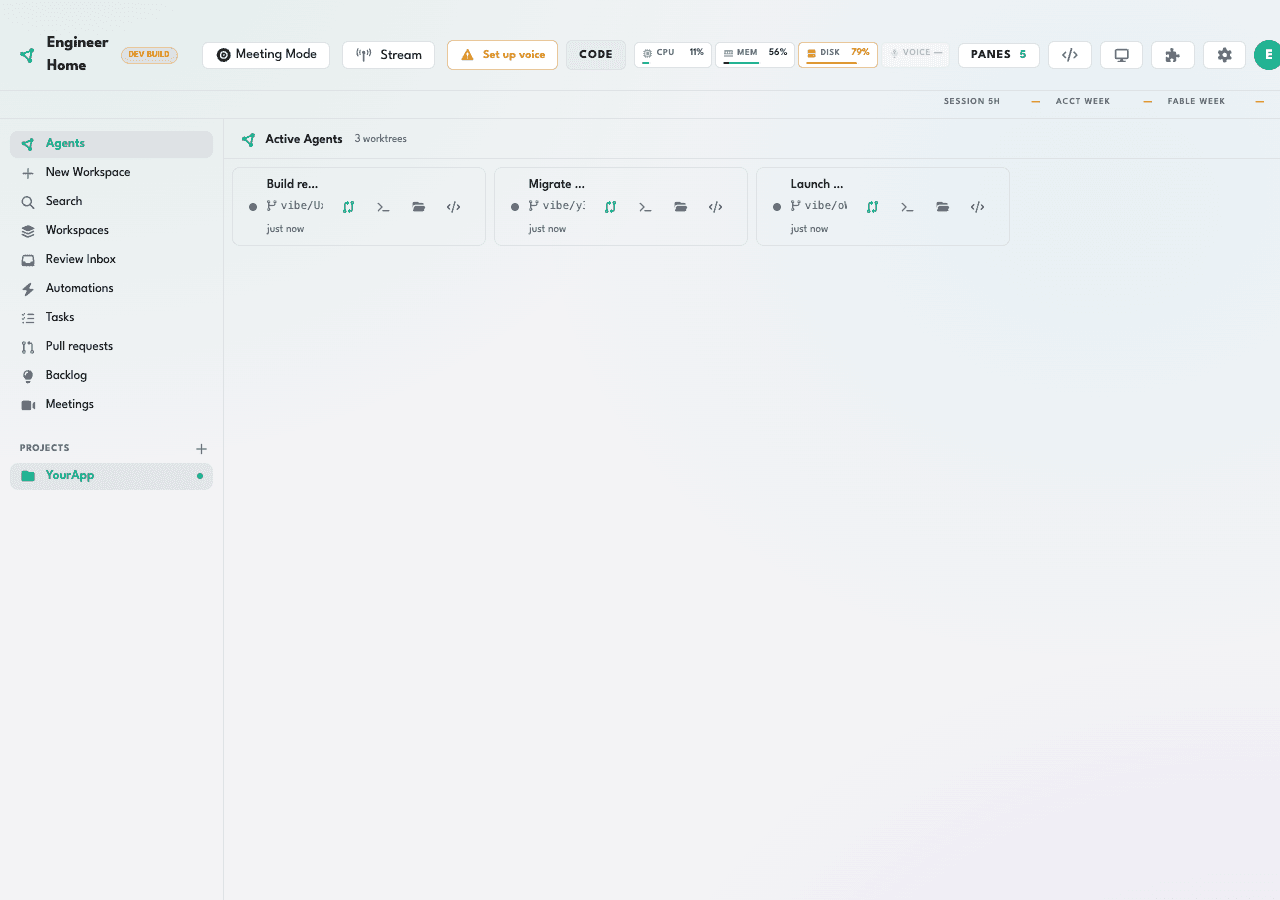
One cockpit, every CLI
Claude, Codex, Gemini, Grok — one cockpit, in parallel. Grok runs as both orchestrator and agent, alongside Claude Code, Codex, and Cursor. Mix providers in a single squad.
Visible, isolated, parallel
Every agent works in its own visible terminal pane, isolated in its own git worktree. Your machine. Your git. No black box.
Provider failover
When a provider fails mid-task, the work fails over to another capable one instead of stalling your squad — retries and failovers are tracked per task.
Bring your own providers
Your existing subscriptions and API keys plug straight in. You pay the providers. We never resell tokens.
Everything in one place. End to end.
Not a plugin collection — a purpose-built cockpit where every capability connects. From the first prompt to a merged pull request.
Studio Home — build without knowing the tools
Describe what you want to build and hit enter. Mr Kody dispatches the right agents automatically — the non-coder's on-ramp to a full AI engineering squad.
Engineer Home — the full IDE cockpit
Pull requests, backlog, review inbox, and active worktrees — one command center. Stay heads-down in the code without losing the mission picture.
Autonomous orchestrator — your AI team lead
Mr Kody doesn't just dispatch — he verifies. Each agent handoff is reviewed before the next worker fires. No other tool offers this delegation + verification loop.
Missions board + isolated git worktrees
Every task runs on its own branch in its own git worktree. Queued → in progress → done, all on the board. Nothing lost, nothing conflicting between sessions.
Parallel multi-agent — every provider at once
Claude, Codex, Gemini, Grok, Cursor — in parallel, each in its own visible terminal pane. Mix providers in one squad, all without leaving the cockpit.
Live preview + built-in DevTools
The auto-run pane opens your dev server and surfaces Console and Network tabs alongside agent terminals — so you see the running app as the agents build it.
Voice control — talk to your cockpit
Speak a command and offline Whisper transcribes it to the focused pane. Fully local, zero cloud dependency, works on a plane. Agents reply in text.
Business integrations — everywhere you work
Slack, Jira, Linear, Salesforce, Zendesk, Google Workspace, Apple, Teams, WhatsApp, and social posting — wired in natively, not bolted on.
Media generation + persistent memory
Generate images and video (Higgsfield), narration (ElevenLabs), and lipsync — then store findings in a cross-session vault that returns automatically to every future agent.
Vibe Sensei आज क्या करता है
मल्टी-एजेंट विकास के लिए विशेष रूप से बनाया गया। टैब, टर्मिनल और बिखरे उपकरणों के साथ जूझना बंद — आपकी पूरी AI टीम एक ही जगह।
सिद्धांततः दृश्यमान
हर एजेंट अपने पेन में चलता है — एक असली, लाइव टर्मिनल। कोई ब्लैक बॉक्स नहीं: आप काम होते देखते हैं और जब चाहें हस्तक्षेप करते हैं।
मॉडल-अज्ञेयवादी
Claude, Codex, Gemini, Cursor, Copilot, Kimi। कार्य, लागत और क्षमता के अनुसार रूटिंग — बार में ही प्रति-पेन मॉडल और खाता बदलने के साथ।
अंतर्निहित MCP प्रोटोकॉल
एक लोकल MCP सर्वर सब कुछ समन्वित करता है: स्पॉन, प्रत्यायोजन, आइडल पहचान और हैंडऑफ़ लॉगिंग। उत्पादन में परखी गई समन्वय की खाई।
लोकल-फ़र्स्ट और निजी
लूपबैक पर 100% आपकी मशीन पर चलता है। आपके टोकन, कोड, ऑडियो — कुछ भी पुनर्विक्रय नहीं, कुछ भी लीक नहीं। हम कभी इन्फ़ेरेंस में मध्यस्थता नहीं करते।
स्थायी स्मृति
प्रति वर्कस्पेस एक Basic Memory वॉल्ट (Obsidian-संगत)। निर्णय और संदर्भ सत्रों के पार बने रहते हैं और स्वचालित रूप से एजेंटों के पास लौटते हैं।
मल्टी-मॉडल तुलना
एक ही प्रॉम्प्ट को 2–4 एजेंटों पर साथ-साथ चलाएँ, आउटपुट की तुलना करें, और सर्वोत्तम चुनें — या संश्लेषित करें। बिना पूर्वाग्रह के आकलन हेतु वैकल्पिक ब्लाइंड मोड।
मीडिया और आवाज़ अंतर्निहित
कॉकपिट से सीधे Higgsfield के माध्यम से चित्र और वीडियो तथा ElevenLabs के माध्यम से नैरेशन बनाएँ — क्रेडिट खर्च करने से पहले लागत-सचेत प्रदाता चयन के साथ।
Docker में लोकल CI
एक CI गेट हर पुश से पहले Docker में gitleaks, टाइपचेक, टेस्ट और बिल्ड चलाता है। बिना किसी क्लाउड निर्भरता के गुणवत्ता की गारंटी।
WhatsApp द्वारा दूरस्थ निष्पादन
वर्कर ऐप के ब्रिज के माध्यम से संदेशों का जवाब देते हैं — अपने फ़ोन से मिशन शुरू करें और ट्रैक करें, ऑर्केस्ट्रेटर जवाब का समन्वय करता है।
एक कमांड से प्रकाशित करें।
लाइव, एक असली डोमेन पर।
ग्राहक SSL के साथ एक प्रबंधित सबडोमेन पर वेब ऐप प्रकाशित करते हैं — बिना बाहरी खातों के, बिना DevOps के, बिना घर्षण के।
शून्य सेटअप
कोई Vercel खाता नहीं, कोई DNS नहीं, कॉन्फ़िगर करने के लिए कोई पाइपलाइन नहीं। कॉकपिट से एक कमांड चलाएँ — आपका ऐप लाइव हो जाता है।
असली डोमेन, तुरंत
हर ऐप को स्वचालित SSL के साथ अपना सबडोमेन मिलता है। जिस क्षण आप पूरा करें, एक उत्पादन URL साझा करें।
प्रबंधित इन्फ़्रा, हमारे खर्चे पर
SSL, CDN, अपटाइम — हल हो गए। आप ऐप प्रकाशित करते हैं; बाकी का ध्यान Vibe Sensei रखता है। प्लान में शामिल, कोई ऐड-ऑन नहीं।
आपकी जेब में दोजो —
WhatsApp के ज़रिए।
अपनी एजेंट टीम को कमांड करने के लिए आपको कंप्यूटर के सामने बैठना ज़रूरी नहीं। एक संदेश भेजें, और Mr Kody पूरे दल को काम पर लगा देगा।
टेक्स्ट या वॉइस नोट
टेक्स्ट या ऑडियो संदेश भेजें — Vibe Sensei ट्रांसक्राइब करके समझता है। चलते-फिरते काम के लिए एकदम सही।
मल्टी-वर्कस्पेस
एक से ज़्यादा वर्कस्पेस हैं? ऑर्केस्ट्रेटर पूछेगा कि किसमें काम करना है — और सिर्फ सही जगह चलाएगा।
कहीं से भी मिशन शुरू करें
टास्क शुरू करें, प्रगति ट्रैक करें और सीधे WhatsApp में परिणाम पाएं — जबकि आपकी मशीन का कॉकपिट भारी काम करता है।
एक स्टेप सेटअप
सेटिंग्स में एक बार अपना WhatsApp Vibe Sensei से लिंक करें। कोई अतिरिक्त खाता नहीं, कोई अतिरिक्त ऐप नहीं।
Across 14 devices, the average active work session runs
10.9m
avg per prompt
top providers
macOS
10.0m
avg active per prompt · Claude
जो हमें नकल करने में कठिन बनाता है
यह "ढेर सारी चैट खोलना" नहीं है। यह समन्वय की इंजीनियरिंग है — PTY, MCP प्रोटोकॉल और git worktree अलगाव — आद्योपांत निर्मित।
दृश्यमान ऑर्केस्ट्रेशन, अंधी स्वायत्तता नहीं
प्रतिस्पर्धी "स्वायत्त" एजेंट छिपाते हैं। हम हर कदम को अवलोकनीय बनाते हैं। दृश्यता विश्वास पैदा करती है — ठीक वही जो आज AI कोडिंग में कमी है।
अज्ञेयवादी और उपयोगकर्ता के पक्ष में
हम आपको किसी मॉडल से नहीं बाँधते और न ही टोकन पुनर्विक्रय करते हैं। हर वेंडर का सर्वोत्तम एजेंट उपयोग करें और सीधे भुगतान करें। पूर्ण संरेखण का अर्थ कम चर्न।
समन्वय की खाई के रूप में MCP
मूल्य एकीकरण में है: अंतर्निहित MCP सर्वर, वर्कर कॉन्ट्रैक्ट, आइडल पहचान और हैंडऑफ़ रजिस्ट्री। उत्पादन में सिद्ध एक प्रोटोकॉल, जिसे अच्छी तरह दोहराना कठिन है।
लोकल-फ़र्स्ट = वास्तविक गोपनीयता
लूपबैक पर, आपकी मशीन पर चलता है। कोड और ऑडियो कभी कंप्यूटर से बाहर नहीं जाते — सुरक्षा आवश्यकताओं वाले किसी भी व्यक्ति के लिए निर्णायक आकर्षण।
उसी ने बनाया जो इस समस्या को जीता है
Pure Power Apps ने कॉकपिट को आद्योपांत परिकल्पित और निर्मित किया — Electron आर्किटेक्चर, MCP सर्वर, मल्टी-एजेंट ऑर्केस्ट्रेशन और वॉइस कोडिंग। कागज़ से लेकर उत्पादन में पैकेज किए गए ऐप तक: सिद्ध निष्पादन।
Your entire AI team, visible. Try it on your own repo.
एक सदस्यता। सब कुछ शामिल।
हम ऑर्केस्ट्रेशन के लिए शुल्क लेते हैं — हम टोकन पुनर्विक्रय नहीं करते। आप AI प्रदाताओं को सीधे भुगतान करते हैं, हमारी ओर से शून्य मार्जिन के साथ। सरल और 1:1: एक सदस्यता, एक उपयोगकर्ता।
SENSEI PLAN
एक सदस्यता, एक उपयोगकर्ता। कभी भी रद्द करें।
- असीमित दृश्यमान पेन वाला मल्टी-एजेंट कॉकपिट
- 6+ ऑर्केस्ट्रेटेड AI CLI (Claude, Codex, Gemini, Cursor…)
- मिशन, दस्ते और git worktree अलगाव
- Whisper के साथ ऑफ़लाइन वॉइस कोडिंग
- स्थायी स्मृति और मल्टी-मॉडल तुलना
- SSL के साथ प्रबंधित प्रकाशन शामिल
- क्लाउड में सिंक की गई सेटिंग्स
- अपने स्वयं के प्रदाता लाएँ — टोकन पुनर्विक्रय नहीं
Vibe Sensei एक नेटिव डेस्कटॉप ऐप के रूप में चलता है। आपकी सदस्यता डाउनलोड अनलॉक करती है — macOS या Windows पर इंस्टॉल करें और अपने खुद के टोकन के साथ अपनी मशीन पर एजेंट्स को ऑर्केस्ट्रेट करें, पूरी लोकल पावर के साथ।
- सब्सक्राइब करें
- डाउनलोड करें
- इंस्टॉल करें
- ऑर्केस्ट्रेट करें
Everything you're about to ask.
If you're on the fence, the answer is probably here. Still unsure? Cancel anytime — the risk stays low.
Who is Vibe Sensei for?
Who is this NOT for?
What happens immediately after I subscribe?
I'm not a senior engineer — can I still use it?
How long does setup take?
Is there a refund or guarantee?
How is this different from a single AI chat or Cursor?
Do I have to buy tokens or models from you?
I've tried "autonomous agents" before and they flopped — why is this different?
What exactly do I get?
Is my code private?
टैब बदलना बंद करें।
ऑर्केस्ट्रा का संचालन शुरू करें।
दोजो में प्रवेश करें। आपका पहला पाठ: एजेंटों को बोझ उठाने दें जबकि आप उस पर ध्यान दें जो मायने रखता है।
कभी भी रद्द करें · आपके टोकन, आपकी मशीन
Built in the open, judged in public.
Specificity over hype. The numbers below are real product facts; the quotes are from real users.
"Running six agents side by side in their own panes completely changed how I build. Instead of waiting on one response and then the next, every agent is moving at the same time — I can see exactly what each one is doing and step in if something goes sideways. That's leverage you simply can't get from a single chat window."
Elvis Silva
Pure Power Apps
"I was spending half my time managing context — pasting code into one chat, waiting, switching tabs, pasting into another. Everything was sequential by accident. Vibe Sensei made orchestration intentional: I can see all my agents working at once, in real terminals, and I'm not the bottleneck anymore."
Luiz Alex
Develon Technologies
"What got me was the transparency. Every agent runs in a real terminal pane I can read, pause, or close at any moment. There's no black box — I know exactly what's running and what it's spending. That kind of control makes it easy to trust the system with real client work."
Mazuquieli Veras
ExpertME
"मैंने Vibe Sensei का उपयोग अपने एप के नए संस्करण को बनाने के लिए किया और मैं वाकई प्रभावित हुआ। कई agents को समानान्तर में काम करते हुए समन्वयित करने में सक्षम होना — सब कुछ दृश्यमान और नियंत्रण में रखते हुए — ने पूरी प्रक्रिया के समय और प्रयास को काफी कम कर दिया। मुझे विशेष रूप से यह पसंद आया कि यह एक ब्लैक बॉक्स नहीं है: मैं टर्मिनल, handoffs, प्रगति और यहां तक कि लागत को वास्तविक समय में देख सकता था। जो पहले से Claude, Codex, Gemini या Cursor के साथ काम करते हैं, उनके लिए यह टूल्स के बीच बार-बार स्विच करने की जरूरत को बहुत कम कर देता है और विकास प्रवाह को बहुत अधिक संगठित बनाता है। बधाई — यह वाकई बहुत अच्छी तरह से सोचा गया है!"
Brandow Buenos
Teams already orchestrating with Vibe Sensei
Want to share your story? Testimonials are submitted from inside the Vibe Sensei desktop app (Settings → Testimonial) and appear here once approved. On-site comments are on the way.